On this page
What “My Journey” answers
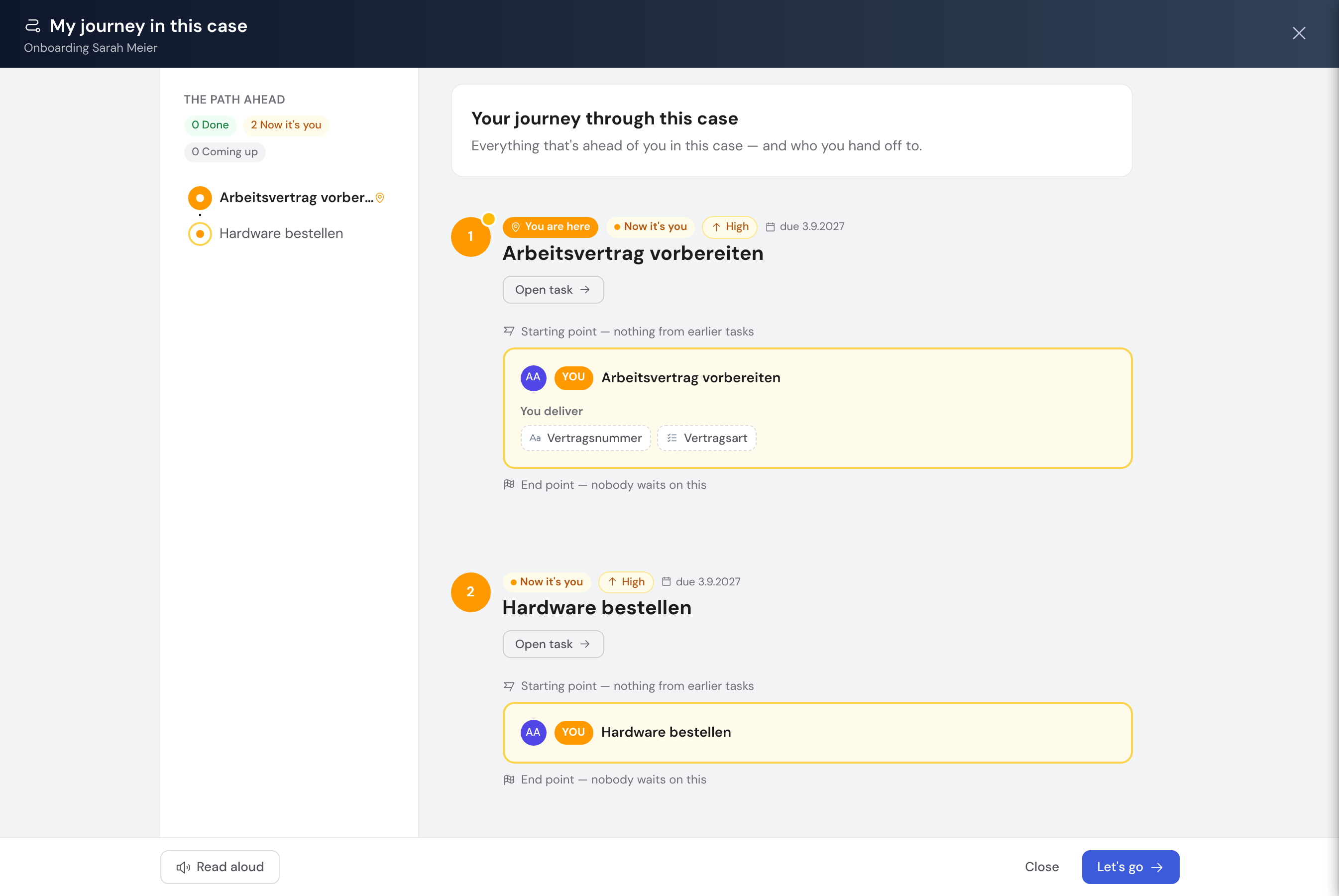
The introduction lays out your tasks in this case in process order and answers four questions honestly:
- What is coming my way? — all of my tasks with their status Done · Your turn now · Coming up.
- What do I deliver? — the fields I fill in across my tasks.
- What do I receive, and from whom? — data from upstream tasks and the specific person (where assigned) or the role (where still open) who provides it.
- Who do I hand off to? — which downstream people or roles need my data.
How you start it
The journey never starts on its own — it does not open automatically when you open a case. You start it yourself any time via the “Introduction” button in the case header. It is rebuilt fresh on every start, so any assignments made in the meantime are reflected.
If you have no tasks of your own in this case (yet), the button shows a neutral overview of how the process runs — without personal delivery and receipt details.
Until the journey is ready you see a brief waiting state — with “Cancel”, and the Escape key does the same. If the case data does not come through completely, the introduction says so and can be closed, rather than passing off an incomplete journey as a complete one. Either way the case underneath stays usable.
Going through the journey
The journey is a stepper: the narration runs on the left, the relevant station appears in sync on the right. Each of your tasks is a stop — with a status chip, due date and the hand-offs. People are at the centre: “delivers to you” shows who feeds into your work, “waiting for you” shows who is waiting on your result — as a specific person where assigned, otherwise as a role.
- “You receive” / “You deliver” — compact field chips; already-delivered upstream values are shown where you are allowed to see them (otherwise “not yet provided” or “no view”).
- Conditional tasks are marked “Conditional” — they only appear if their branch is taken.
- “Open task” jumps straight to a station; “Let’s go” at the end takes you to the task that is currently your turn.
Via “Read aloud” your browser reads the narration to you step by step (pause/resume/stop) — handy for listening to the journey alongside your work.
Who feeds into whom is inferred from the fields in V1. Such inferred connections are subtly marked as “derived” so they are not mistaken for established facts.
As a template author: adjusting the texts
The narrative text is drafted per task by the AI — you don’t have to write anything. In the template editor you can refine it under “Introduction texts”: “Regenerate (AI)” produces a fresh draft, and “Save” marks your text as “edited”. An edited text is preserved on a later regeneration. This requires the permission to edit the template. If a text names a field that has since been deleted or renamed, the check button in the template header shows a hint (“Introduction text of “…” is out of date”) – with “Regenerate” for an AI text, and for an edited text to adjust by hand. In “Introduction texts” the task is then marked “out of date” with the affected passage below.
Limits
“My Journey” is available to internal members today; guests and external submitters will follow later. It is view-only — it changes nothing in the case — and shows only what you are allowed to see. The “from whom / to whom” connections are inferred heuristically from field names in V1.