On this page
What a schedule is
A schedule connects a template to a rhythm: at the set time a new case is created from that template and starts — without anyone opening it by hand. Recurring work is reliably timed and never forgotten.
Creating a schedule
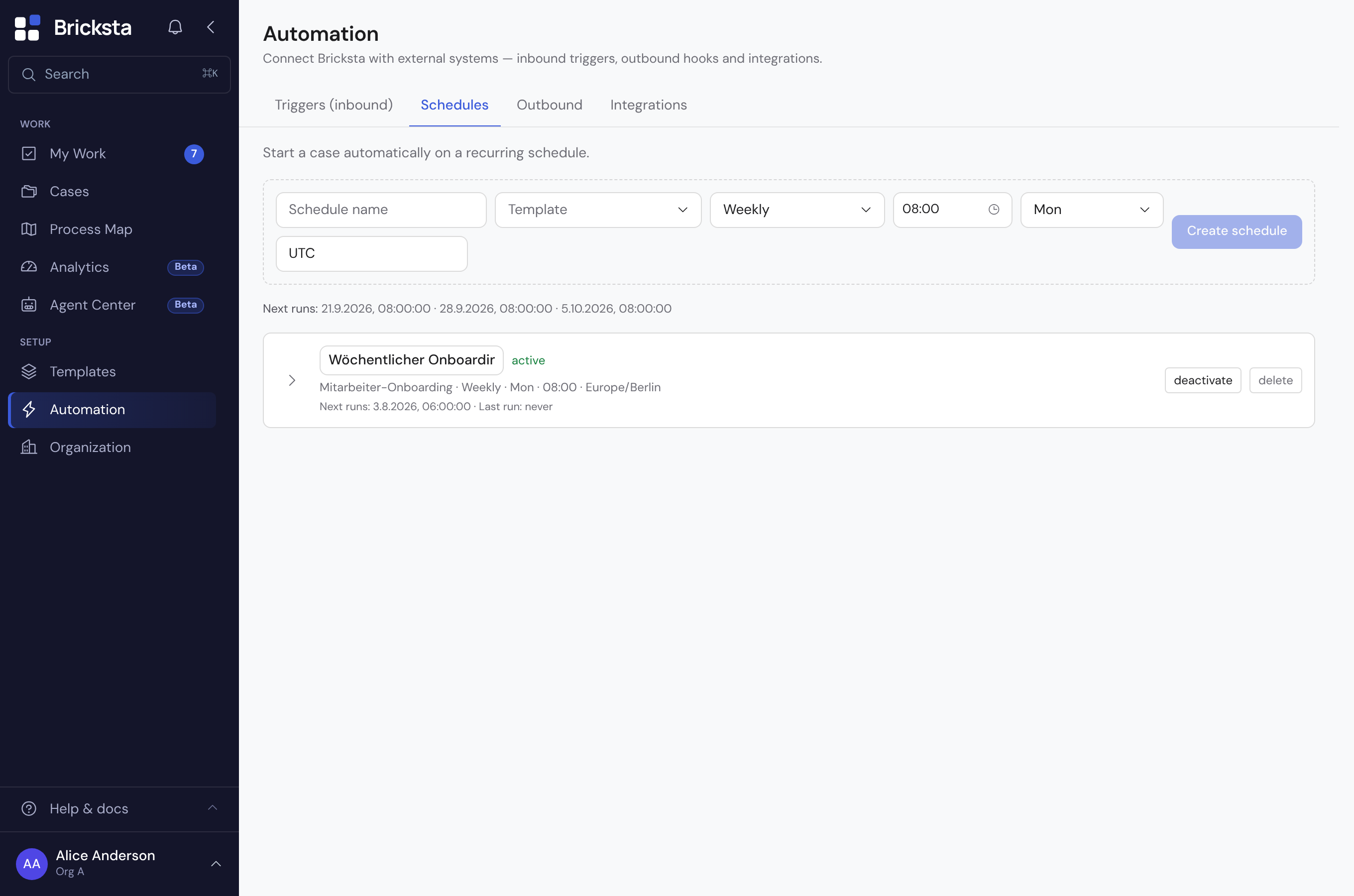
- 1Open Automation → Schedules and click “New schedule”. The form opens right at the button, on a phone as a sheet from the bottom.
- 2Give the schedule a name and choose the template the case is created from.
- 3Pick the rhythm: daily, weekly, monthly, quarterly (in January, April, July and October) or yearly — or “Custom expression” for a cron expression.
- 4Set the time and, depending on the rhythm, the weekday, day of month or month, and choose the time zone. Below the rhythm the schedule reads as a sentence, such as “every Monday, 07:00” — the same sentence the list shows later.
- 5Check the preview: it shows the next three dates in the schedule’s time zone.
- 6Click “Create schedule”. It is switched on right away.
If the template has several workflows that start at the beginning, you also choose which of them the schedule starts — workflows that only begin after another one follow on their own. If your organization works with categories, you can pick one; otherwise the template’s default category applies.
A schedule always needs a template — without an active template it cannot be created, which is why “New schedule” stays disabled. The page tells you so right away: create one under Templates first, and it will be available to pick here.

Changing, pausing or deleting a schedule
Click a schedule in the list: the same form opens. Every change is saved right away, and only the field you changed. Use the “Active” switch to pause a schedule without deleting it. Expand the run log in the form: it shows when a case was created and whether there was an error. Switching on and off and deleting are also in the row’s ⋮ menu; deleting always asks first. Cases already created stay when you delete a schedule.
Schedules in the template
The template editor shows too whether a template starts on a schedule. In the list, open the “Flow” button of a workflow: under “Starts”, after the sentence “A schedule also creates new cases:”, every schedule of this workflow is listed with its rhythm and next run — or “off” or “not running” with the reason. If a schedule starts only certain workflows, “starts only …” with their names is shown below it. A click opens the same form as on the Schedules page. With “Set up schedule” you create a new one on a workflow that starts at the beginning; the template is then fixed, and if it has several such workflows, this one is preselected. This works only for an active template. A workflow you add in the draft only counts for the schedule after publishing — until then, a schedule that starts only that workflow is shown in yellow. If a workflow also starts on a schedule, the “Flow” button carries a clock.
In the flow diagram the same workflow carries a badge with a clock at the top right of its frame: for one schedule its rhythm in short form, such as “day 1, 08:00”, for several “2 schedules”. Schedules that are switched off do not count. Yellow means a schedule is not running right now. A click opens the form, for several first a list to pick one from. If the frame is narrow, the badge shows only the clock, for several schedules the clock and the count. The diagram’s help explains the sign.
In the BPMN diagram every switched-on schedule appears as its own start circle with a clock close to the start, alternately above and below it — the timer start event; switched-off schedules are left out. Its line leads straight into the workflow it starts, for several through its own parallel gateway. If it starts the same as the manual start, both first run into a shared gateway (×, one of the starts) and only then onwards — so the lines don’t cross and they meet symmetrically. The view by responsibility has no workflow frames: there the line leads to the workflow’s first tasks, and the circle sits within a lane, never on its border. If the schedule cannot run right now, the circle is yellow, like the badge in the flow. If none of its workflows is in the diagram, the circle is missing and a note names the schedule. A click on the circle opens the same form. In the exported BPMN file the start circle carries the rhythm as a cron expression with a leading seconds field, the way Camunda 8 reads it, and, as documentation, the name, time zone and the expression as Bricksta stores it. Camunda 8 evaluates the expression in UTC, and the time zone is only in the documentation: a schedule at 08:00 German time would run there at 08:00 UTC, one hour later, two in summer. The expression is not meant for Camunda 7 and similar tools — they expect a different notation and reject it or run it on a different day. If you import a BPMN file with a timer start, Bricksta does not create a schedule from it: the preview names it, and you set it up in the template afterwards.
When a schedule cannot run
Bricksta keeps checking whether a switched-on schedule could create a case at its next time. If it cannot, the list shows it in yellow as “not running”, and the form names the reason: the template is inactive or has never been published, the person it runs on behalf of is no longer an active member or lacks the rights it needs, the category is inactive, or none of the selected workflows is in the template’s published version. Once you fix the cause, the schedule runs again at its next time. If only a single run failed, the form shows that as a grey note — the schedule itself is fine.
Managing schedules requires the template-management right (template.manage). The cases are created by the “Timer”, not by a person; it only does what the member the schedule runs on behalf of may do. That member therefore needs the right to create cases (case.create) — Bricksta checks it when saving, when re-enabling and before every run — and every run checks whether they may choose the workflow (workflow.select). A schedule that runs on behalf of another person can be renamed, switched off and deleted by you; only admins or that person change its rhythm, time zone, category, workflows or switch it on. A schedule’s template is fixed once it is created. The case history shows “Timer”. Missed runs (for example after an outage) are not caught up: one case is created, then the next regular time applies.